Posts

Vim: surround a list of sentences with HTML tags

Image
If you have a list of words or sentences in Vim and you need to add a couple of tags around each of them you cannot siply use the V (upper v) command to select all of them before using vim.surround because in this case you get only one couple of tags for all the list.

Vim, changing a tag around a word in HTML mode

Image
In Vim HTML mode if you need to surround a word with a tag you can effectively use vim.surround with the cursor anywhere in the word using the following string: ysiw followed by the specific desired tag.

Vim and Emacs: Cut, Copy and Paste

Image
Table of Contents 1. The traditional Cut, Copy and Paste key combinations 2. Vim and the clipboard 3. From Vim to Clipboard 4. From Clipboard to Vim 5. Vim and the shortcuts 6. Emacs and the clipboard 7. Kill, Copy and Yank in Emacs

Swap two words in Vim using text objects

Swap two words is a good exercise in Vim and its commands, including the text objects . In this article I will try to solve two possible scenarios for the exchange of position of two words without using any changes to the basic Vim settings .

LaTeX inverse search with SumatraPDF

Image
In this article I will explain how the inverse search (or inverse synchronisation if you prefer) may work, in a Windows operating system, between a source document in LaTeX, written via a command line editor, and a PDF reader.

From spreadsheets to LaTeX tables

Image
Definition of the target You've a table with some columns and rows (in the example: four columns and six rows) in a spreadsheet. You need to transpose the table in a LaTeX document. Yes, I know! You could use the features of an IDE to add speedly everything you need. But considering that we are inside a worksheet, why not use the column management functions of the worksheet itself? To reach the target directly from the spreadsheet, you can proceed in three steps. The first step is entirely inside the spreadsheet. The second one consist of the transfer of the prepared data to the LaTeX document. The third is the completion of the code in LaTeX.

Quickly enter data in legal documents with bookmarks in Vim

Image
A working scenario: legal acts with preset data In a legal act there are standard data used in many documents: name of the lawyer, name of the claimant, place of the court of justice, date of the hearing, etc. So, to save time, it is useful to have a system to upload data into the document once and to use them whenever you need during the preparation of the document. LaTeX is an excellent system to write legal acts. And one of the most effective tools for writing LaTeX code is Vim . Create a Vim document with bookmarks Vim has a native command to set bookmarks: the mark command. In the simplest way you can set a bookmark in Vim by pressing, in Normal Mode, the key m followed by a letter. An elementary example could be the combination: ma that create the a bookmark. You can put this bookmark wherever you want in the document. So you can put a bookmark, for example, where you need to enter data in a legal act: ma for the name of the defendant, mb for the name or the claima...


LaTeX: create and use variable names

Image
latex_variable.html Why we talk about variables in LaTeX? I use LaTeX to write legal documents. Legal documents are full of names and data that can be entered several times. I need a system to enter the names and the recurrent data only once in the act, both to avoid wasting time rewriting the same things and to reduce the risk of typing errors. The solution is the newcommand command.

Vis, Vis, Vi, Vim... Gvim

Image
Via RayHightower.com Latin and Technology Via Pixabay.com Do You know the Latin language? And do You know declination for the word "Vis", the Latin word for "Force" or "Vigour"? No problem. This is not a Latin lesson. We must know that "Vim", today, is not intended as a Latin word. When I went to school and studied Latin, many and many years ago, I would not have imagined that I would have associated that name to some technological jewels. Vim, Vi and Gvim represent the essence of efficiency and lightness. Why Vim? Why Vim? You could say: I don't need an old-style text editor, I can use the modern graphical editors, with the visual menu and a lot of functions . Yes, obviously. But Vim has a different philosophy: to minimize keystrokes and finger movements.  One keystroke is better than two. A jumping keystroke is better than a mouse movement. With only one keystroke you can instantly fly from the begin to the end of a word,...

Smart jumping with cheap mind mapping software

Image
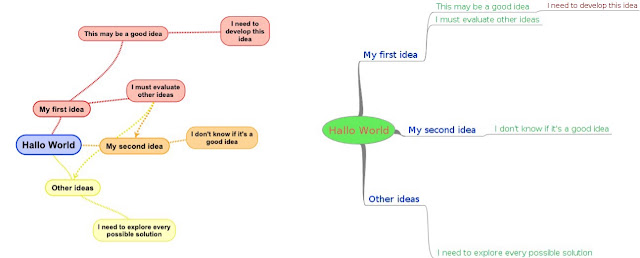
A little introduction to the Mind-Mapping tools The same map in two different visualizations Mind-mapping tools can really help to increase your creativity and concentration about every kind of problem. Their purpose is to map the connections of the brain with a visually structured map. Using the mind-mapping tools you can "see" your thoughts and focus on them. You can use the visual maps to "see" more solutions to any problem. There are a lot of different mind-mapping apps for every kind of device and operating system. Some of them are free and open-source. The best solution is to share all your maps through different kind of devices: computer, tablet or smartphone. Maybe running various kind of operating systems running on them. And, if possible, save your money. You can share the maps through the devices using a cloud service like Dropbox, even in the free version. Assuming you use different devices like a computer, running Linux, or Windows, or M...

How to net install TeXLive under Linux

Image
A little preface TeXLive is one of the most complete distribution for LaTeX. It's better not to use the Linux commands for TeXLive installing, as the following: " sudo dnf install texlive-scheme-full " in Fedora or " apt-get install texlive " in Ubuntu and derivated. The best installation tool is the original TexLive distribution. It's very easy (if I could do it, everyone can do it). For a complete description of the various installing tools for TexLive you can read the Tex Live availability page .